 triib
A tour of triib
What each part of triib does and how to use it. The pictures show a small network of three entities, a lectern, a Wi-Fi speaker and a Mac mini, with a host entity beside them, and the networks of a show and of a venue.
Picking an interface
triib works on one network interface at a time: pick it from the menu at the left of the toolbar, which shows each wired interface with its speed and whether it has a PTP hardware clock. The filter beside it hides virtual interfaces unless you ask for them, and can hide wireless interfaces and those without a PTP hardware clock too. The status bar says how the interface is doing and the entity ID triib discovers as.
triib asks every entity to announce itself when it starts, and again whenever you press the refresh button. Each entity it finds has its entity model read once and kept, so a device you have seen before shows in full at once the next time.
On Linux triib needs CAP_NET_RAW, on macOS access to /dev/bpf*, and on Windows Npcap. The packages set the first two up; when something is missing, triib says what and how to fix it, and where a command grants it, carries on as soon as the command has run. On a Mac, triib reaches the Mac's own AVB entity through Apple's AudioVideoBridging framework, as macOS never hands that entity what a program writes to BPF.
Connections
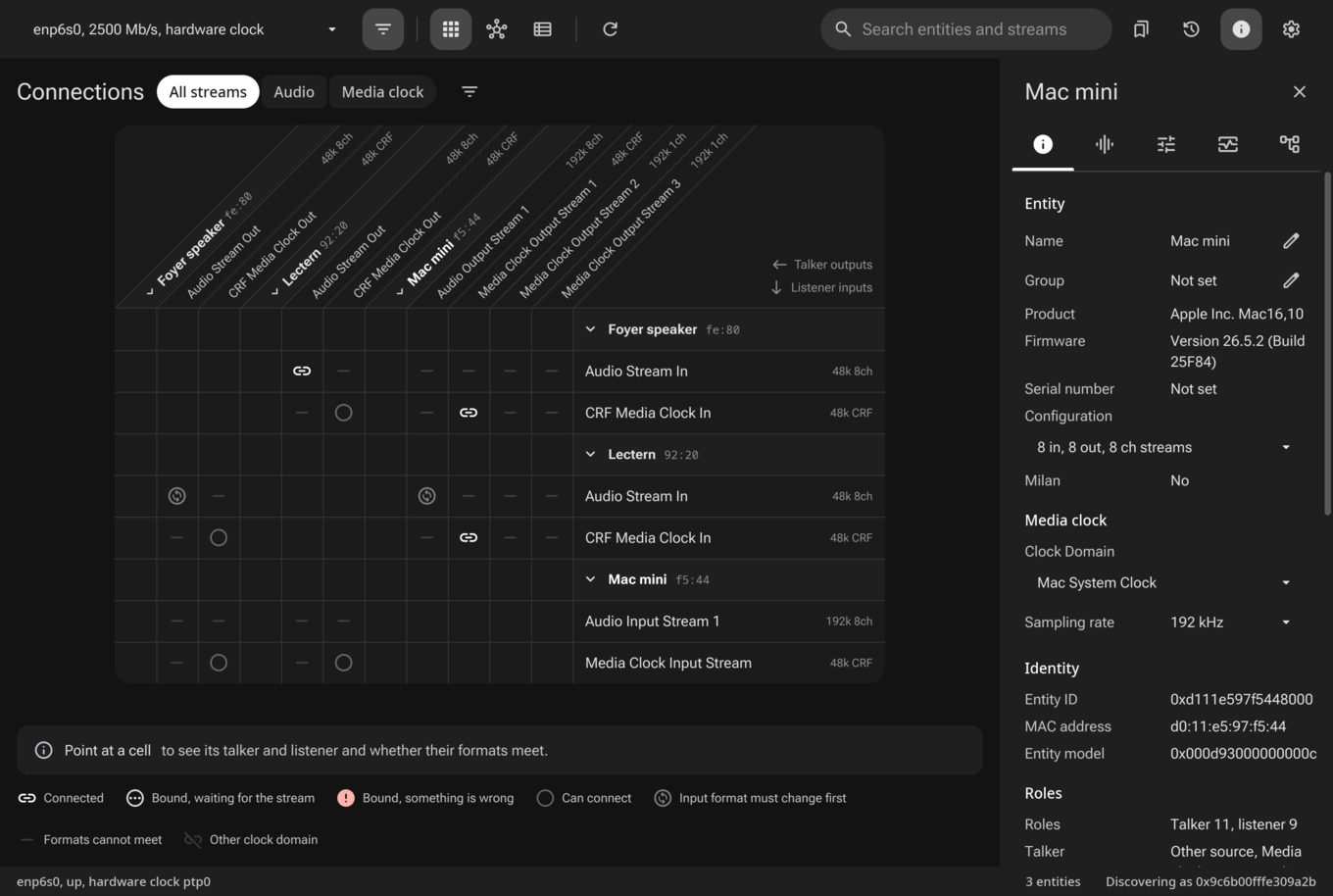
The matrix has every talker output across the top and every listener input down the side, grouped by entity. Point at a cell to see its talker and listener and whether their formats meet; click it to connect or disconnect. An entity's row folds into one line, where a cell says how many of its streams are connected, and opens to connect them one by one; triib remembers which are folded.
| A cell shows | Meaning |
|---|---|
| Connected | The listener is bound and receiving |
| Bound, waiting for the stream | The listener is bound, but the talker's stream has not arrived yet |
| Bound, something is wrong | Bound, but the reservation failed or the formats differ; pointing at it says which |
| Can connect | The formats match: click to connect |
| Input format must change first | The input takes the stream but is set to another format, so it may not play until its format changes |
| Formats cannot meet | The talker and listener have no format in common |
| Other clock domain | The talker and listener are in different clock domains, as the network map shows them, so they cannot connect |
Click a cell marked Input format must change first for a menu of the formats both ends take: pick one and triib changes the input, or both ends, and connects.
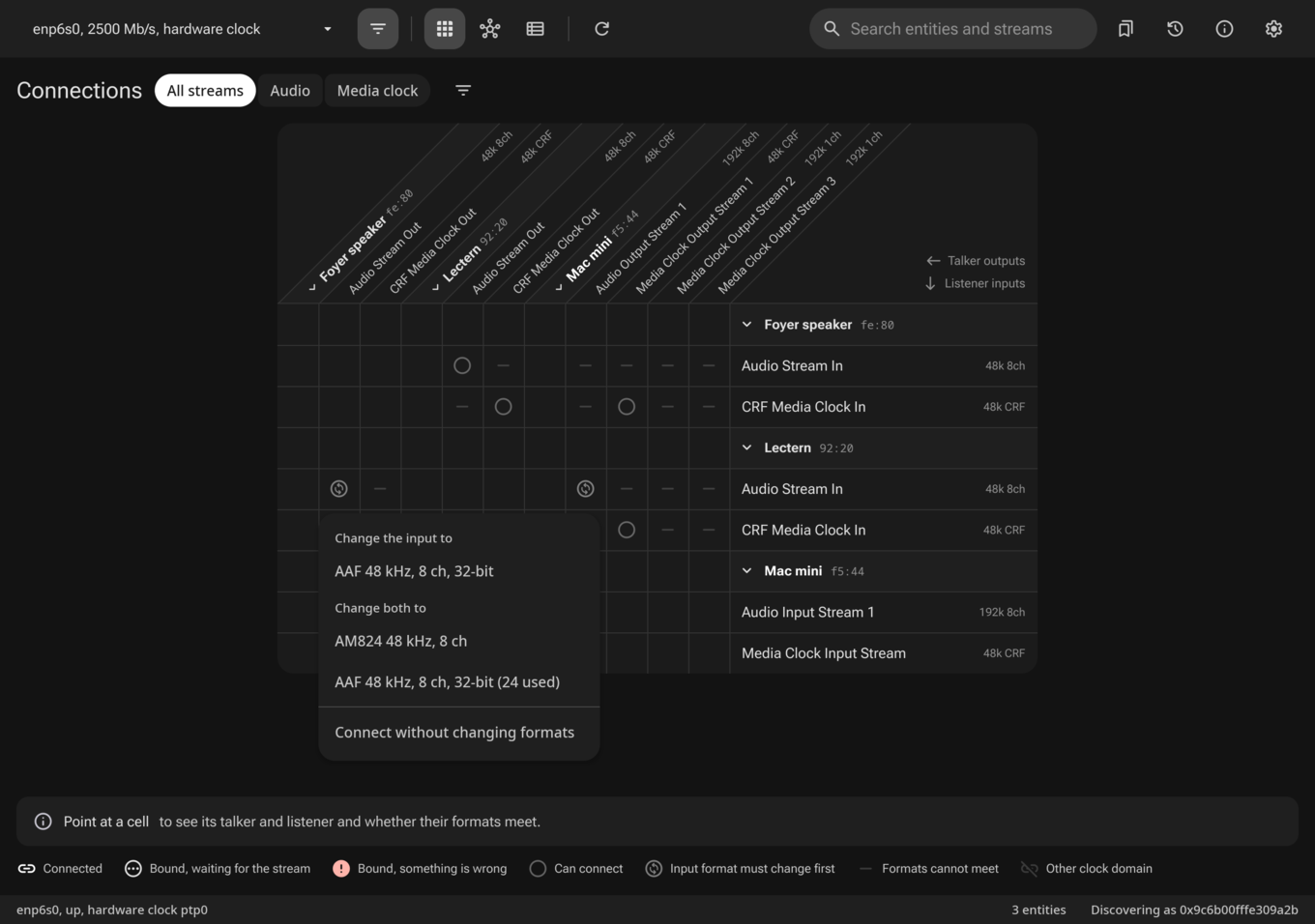
The chips above the matrix show all streams, only audio or only media clock streams. The filter menu beside them hides the streams that cannot connect, the entities running AVB Lite and the wireless entities, and says how many streams it hides. The search field in the toolbar finds entities and streams by name.
Entities
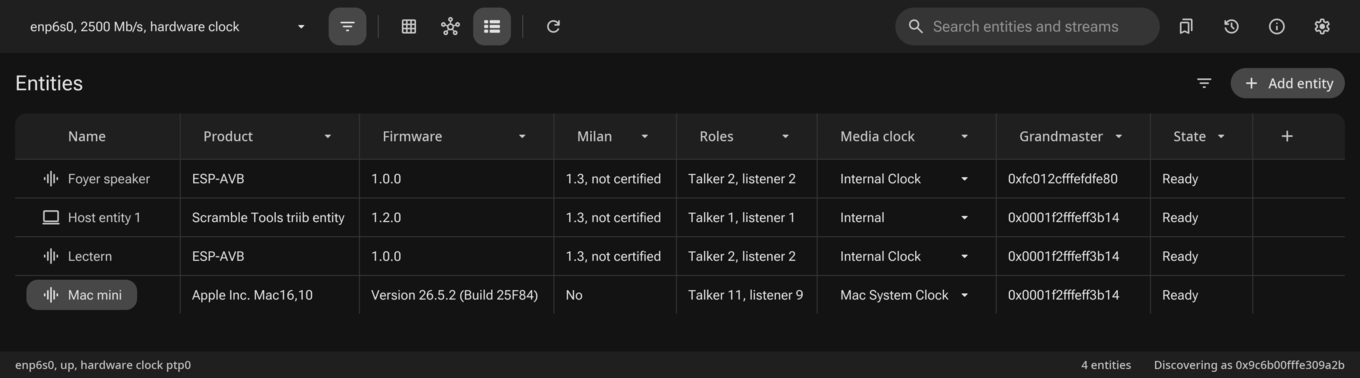
The entity list has a row for each entity: its name and group, product and firmware, Milan version, roles, media clock and more. The media clock's menu changes an entity's clock source right in the list. Each column header has a menu to move or remove its column or add another, such as vendor, model, state, AVB Lite, egress, or the entity's logo and its vendor's. The filter menu above the list shows only this computer's entities, hides controllers, or hides entities outside this computer's clock domain, and says how many it hides.
On Linux, Add entity adds a host entity; see below. Controllers that do not advertise, as the Mac's own does not, are listed from the commands triib hears them send, each named for the computer it runs on, until five minutes after their last.
Inspector
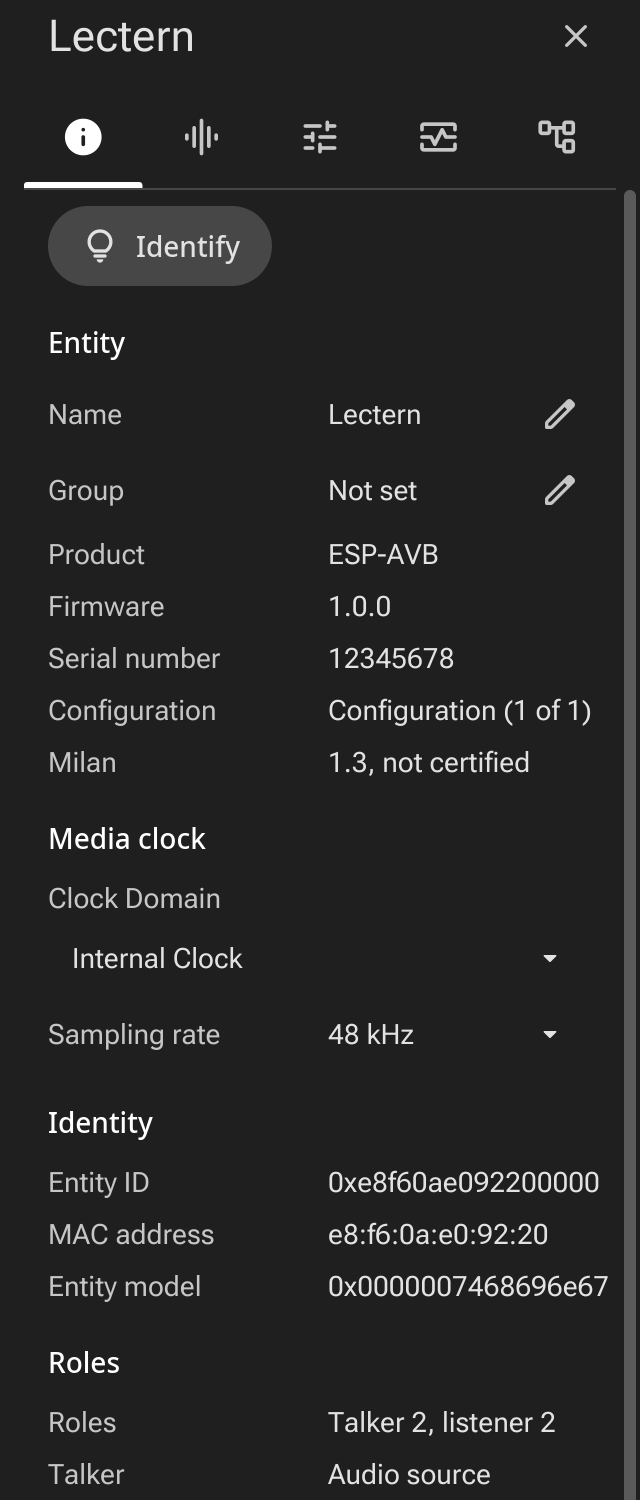
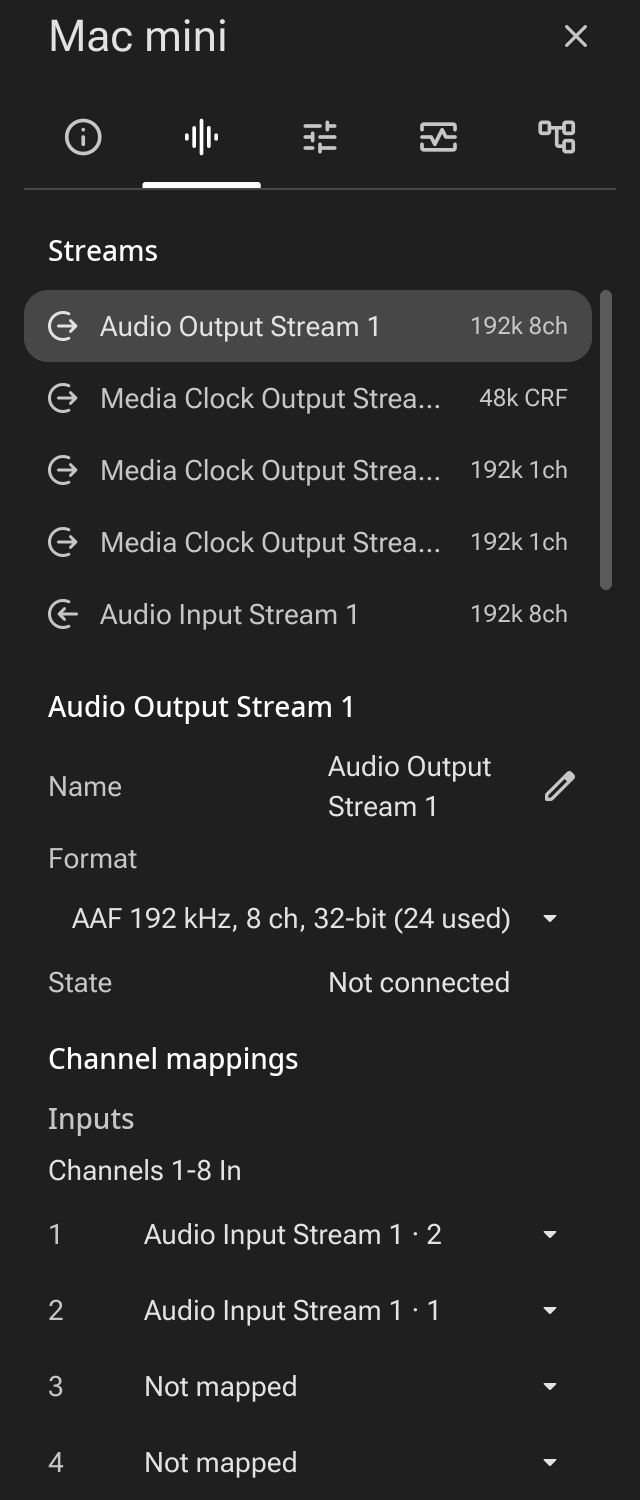
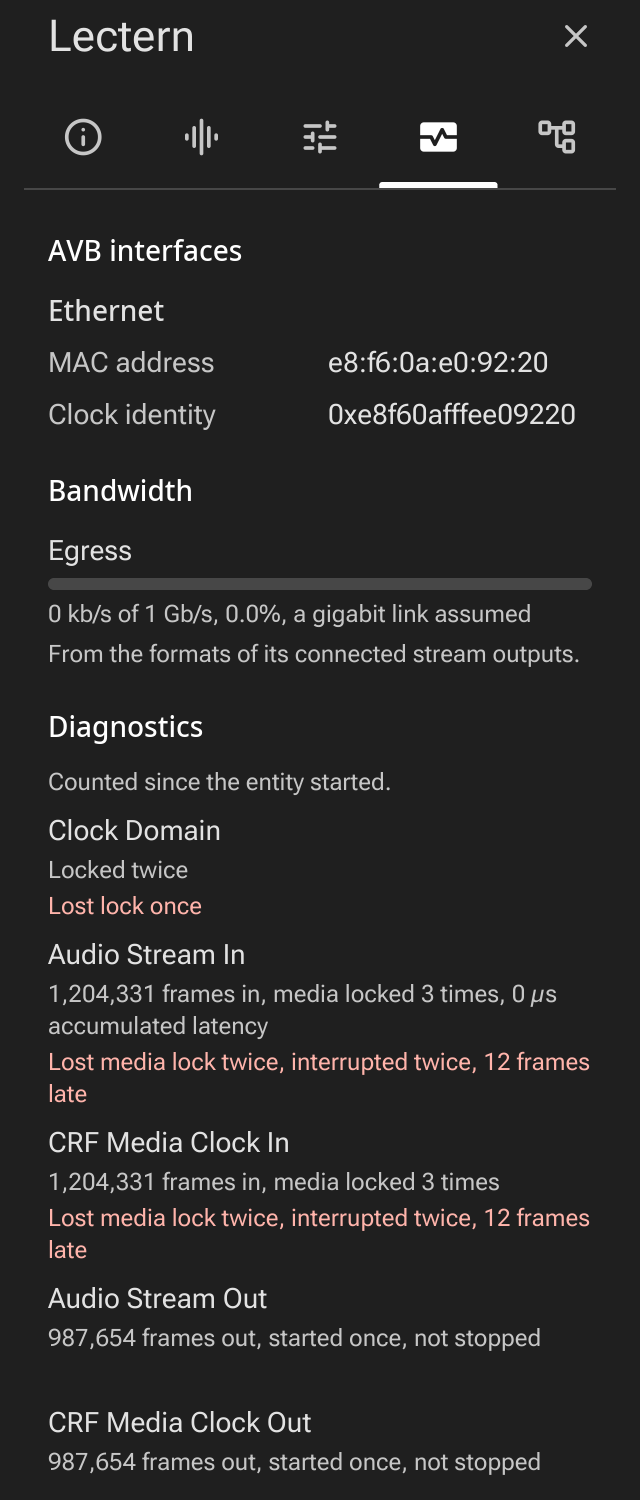
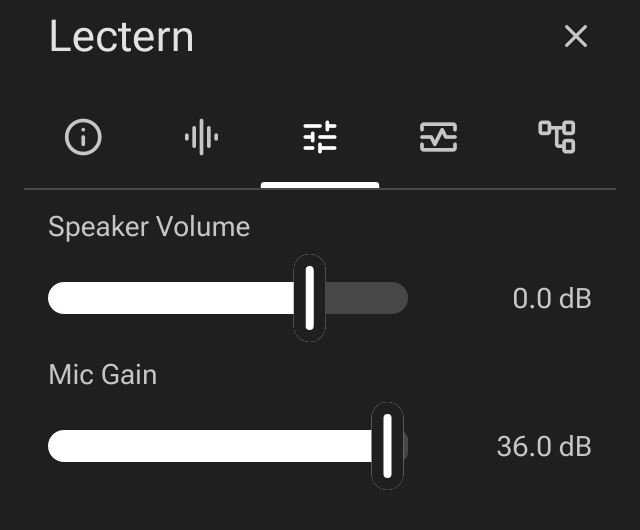
Select an entity, in the matrix, the entity list or the network, and the inspector, titled by its name, shows all there is to know about it, in five tabs. A short value sits beside its label, a longer one under it.
- Entity: its name and group, which you can rename, its product and firmware, its logo and its vendor's where it has them, its configuration, picked by name where it has several, its media clock with the clock source and sampling rate to change, its AVB Lite and AVB Wireless state, its identity and roles. Identify makes the device show itself, as by a blinking light.
- Streams: its streams, outputs then inputs, each this computer carries with a peak meter, and the picked one's details: its name, its format, which you can change, its state, stream ID, destination and VLAN, an output's maximum transit time, which you can pick, and its listeners where its talker keeps them, each with a button that disconnects it; then how the streams' channels map to the entity's audio.
- Controls: the entity's controls, such as gain, volume and mute, to set.
- Diagnostics: its AVB interfaces and what its streams take of each link, how each clock domain and stream has fared since the entity started, from the counters it keeps, with what went wrong marked, and how each bound input's reservation stands.
- Descriptors: the entity model itself, descriptor by descriptor.
Firmware updates
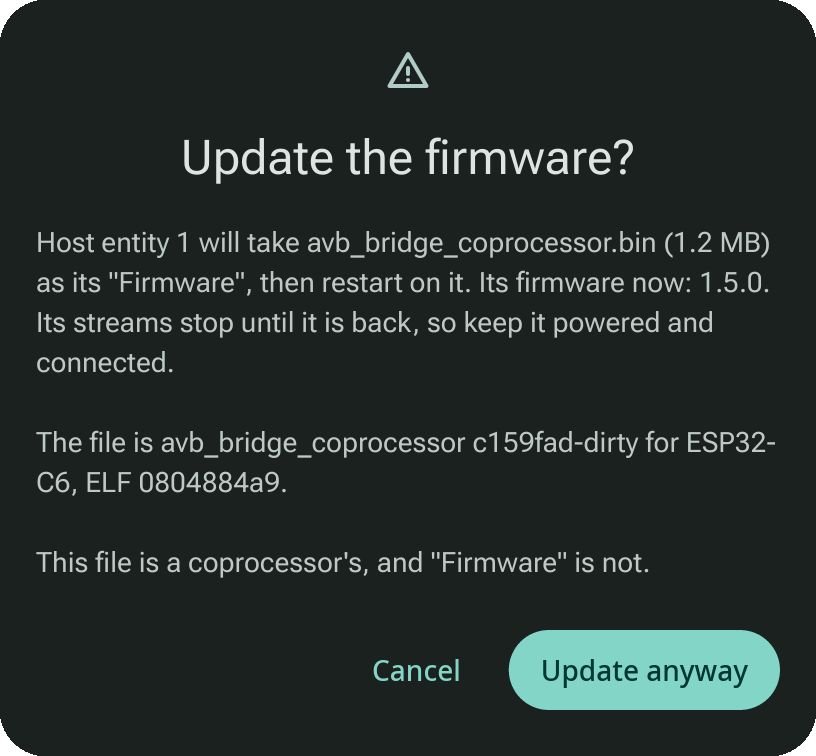
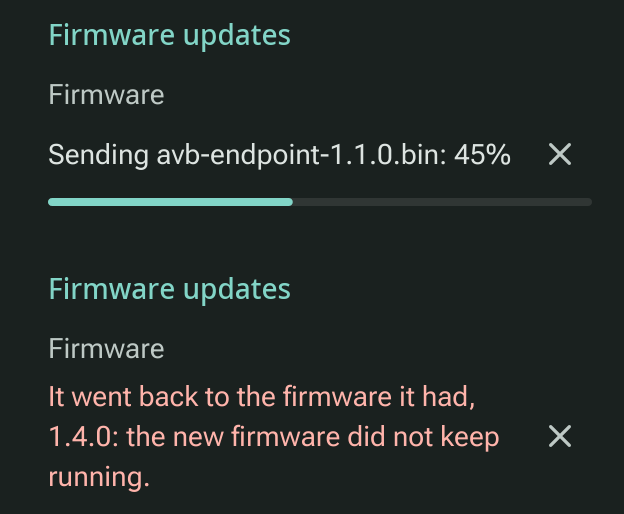
An entity that takes new firmware over ATDECC, as IEEE 1722.1-2021 Annex D has it, lists each image it takes it in under Firmware updates, in the inspector's Entity tab: its own firmware and, where the device has one, its coprocessor's, such as a Wi-Fi chip's. Update from a file… picks the file for one.
Before anything goes, triib asks you to confirm, with the file, its size and the firmware the entity runs now. For an ESP-IDF app image it says what the file is, its project, version and chip, and why it doubts the file suits the image: a coprocessor's file for the device's own firmware, or the other way round, or a file unlike the one the same model's image took last time, and then the button reads Update anyway. It notes a file that is not signed, which a device checking signatures refuses, and one the entity runs already.
A coprocessor may keep no copy of the firmware it had, so if its new firmware does not run, recovering the device can take a cable: send it only a file tested on that device, as the confirmation reminds you.
Once you confirm, triib locks the entity against other controllers' changes, and the image's row shows how far the update has got, from sending to storing and restarting. Until the entity stores the file, Stop the update stops it, and the entity keeps the firmware it had. Its streams stop until it is back, so keep it powered and connected; where it refuses the file, triib says why.
Back on new firmware of its own, the entity is watched for 75 seconds. One that goes back to the firmware it had, as an ESP32 does when its new firmware does not keep running, shows it, and so does one that comes back on firmware other than the file sent: an ESP32's version ends with its firmware's ELF hash, which tells them apart.
triib-cli firmware lists an entity's images and updates one from a file, --image picking which where it has several; it refuses a file for the other processor unless --anyway, and watches for the entity going back for 75 seconds or --settle. AI agents do the same through firmware_status, update_firmware and stop_firmware_update, and stop at triib's doubts unless you still mean it once the agent has told you why.
Device log and crash dump
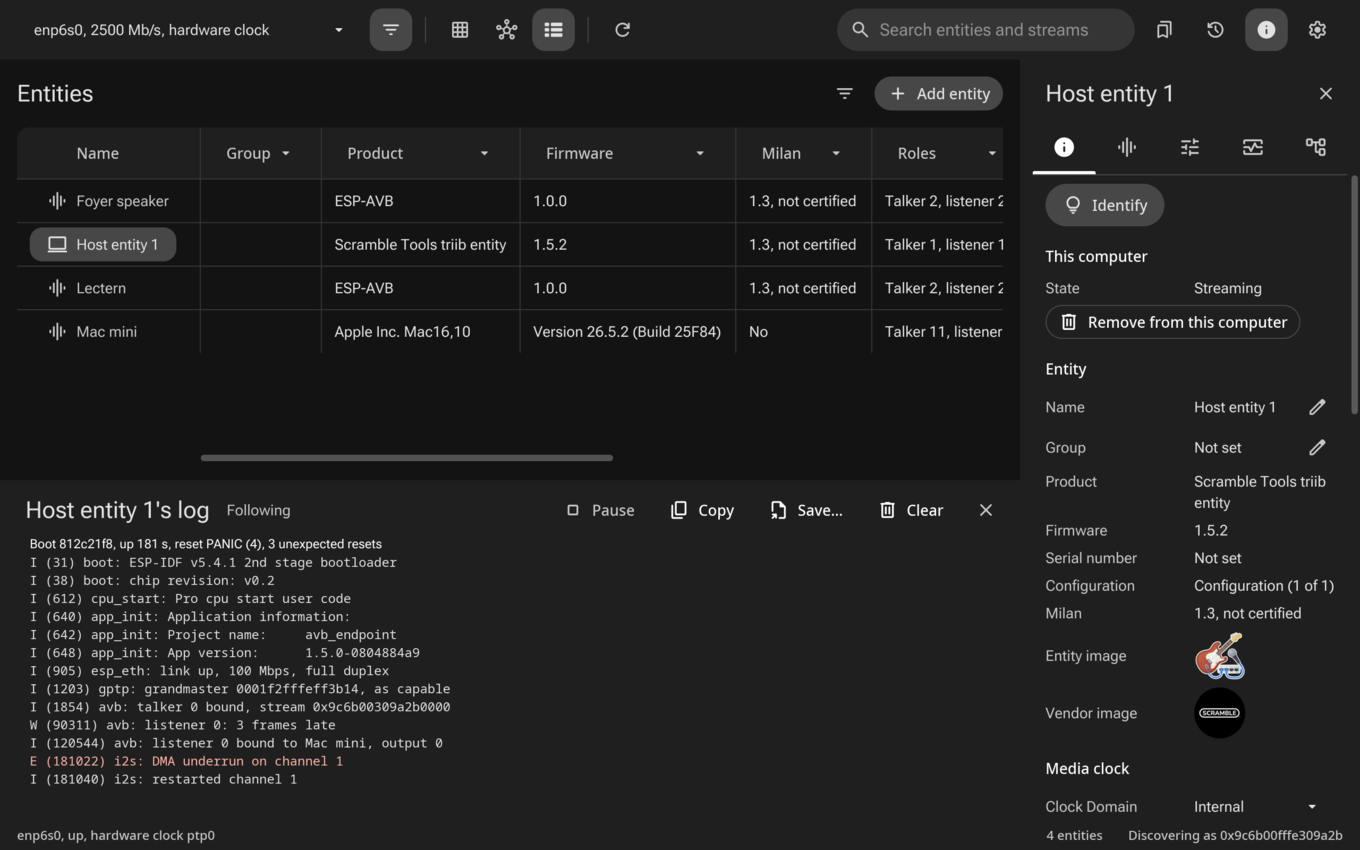
A device that keeps a log for controllers to read, as an ESP32 board keeps its console, has a Device log section in the inspector's Entity tab. Show the log opens it in a panel under the view, where the frame log goes, and follows it as the device writes it: its lines as written, an error's in red, and between them each boot, with how long it had run, why it began and how many boots began unexpectedly where the device says, a restart, and lines lost when the device wrote faster than triib read. Pause holds the lines shown, and Copy and Save… take the log as text. Closing the panel stops reading; showing the log again goes on where it stopped.
A device that keeps a crash dump shows how large it is. Save to a file… reads it and saves it, and reading never clears it; Erase clears it, once you confirm. An ESP32 board's crash dump is ESP-IDF's core dump, which esp-coredump reads with the ELF of the firmware that crashed.
triib reads both over ATDECC, from the LOG_OBJECT and CRASH_DUMP memory objects the device keeps, through Address Access, and asks the device nothing unless one is shown or saved. triib-cli log prints a device's log, named by its entity ID or its name, --follow keeping on and --stats saying what reading costs; triib-cli crash saves a crash dump and with --erase erases it. AI agents read logs through device_log and save crash dumps through save_crash_dump.
Network
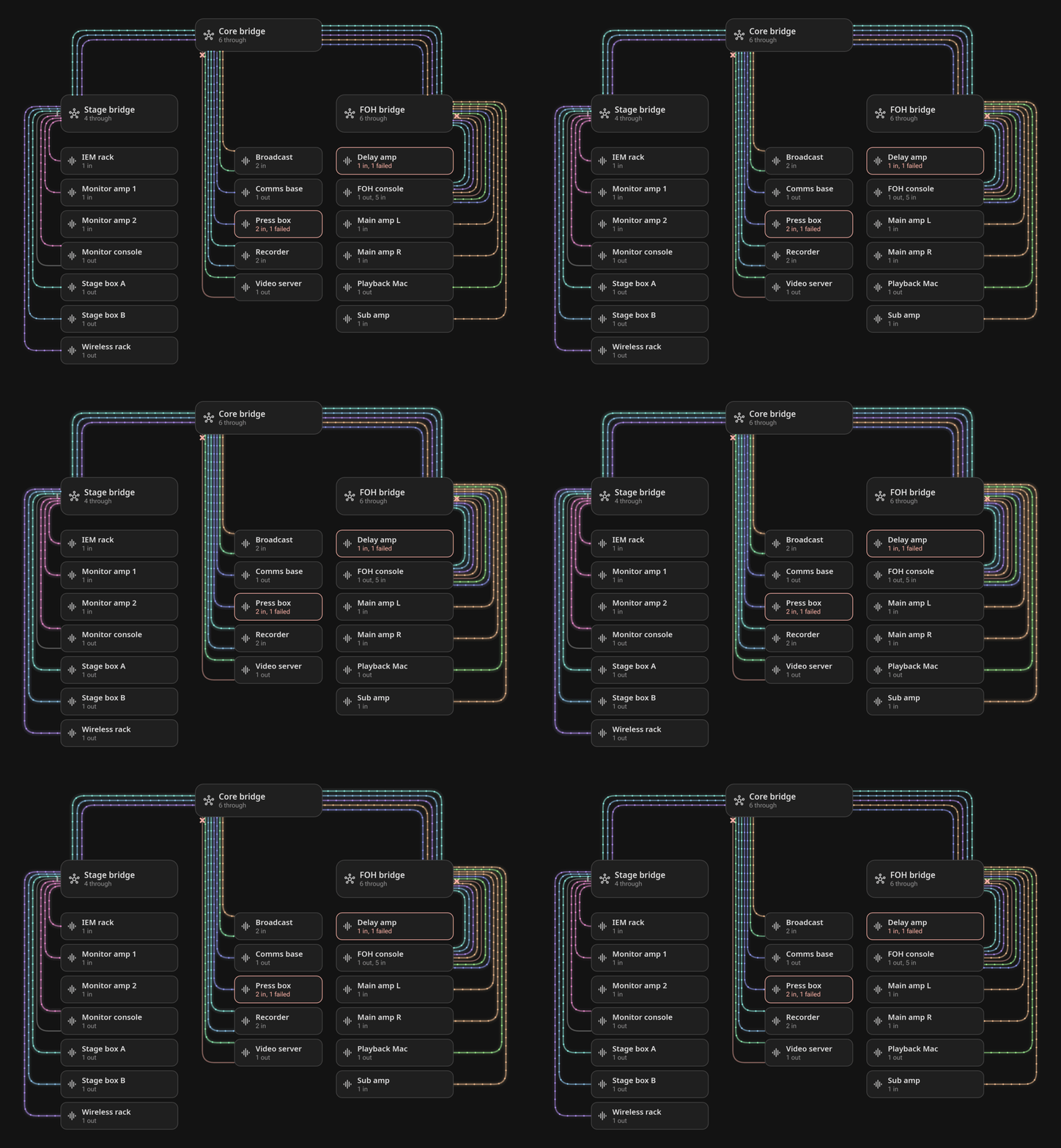
The network view draws the network from each entity's gPTP path, each clock domain in an area of its own: bridges at the top, the devices behind each of them below, and those connected straight to the grandmaster's bridge in the middle. With nothing picked on the map, the inspector counts what it shows and lists what needs attention. The chips switch what is drawn on the map:
- Sync: the clock tree from the grandmaster, with each device in sync or not.
- Audio: each stream on the links it crosses, entering and leaving every bridge on its way: a multicast stream takes one wire as far as its listeners' paths run together and branches where they part, and a unicast stream has a wire to each listener. Each talker has a hue and its streams are shades of it. Moving dots mean audio is flowing; a still red line is a failed reservation and a still grey line is advertised with no listener ready, both stopping where the reservation stops.
- CRF: the media clock streams, the same way.
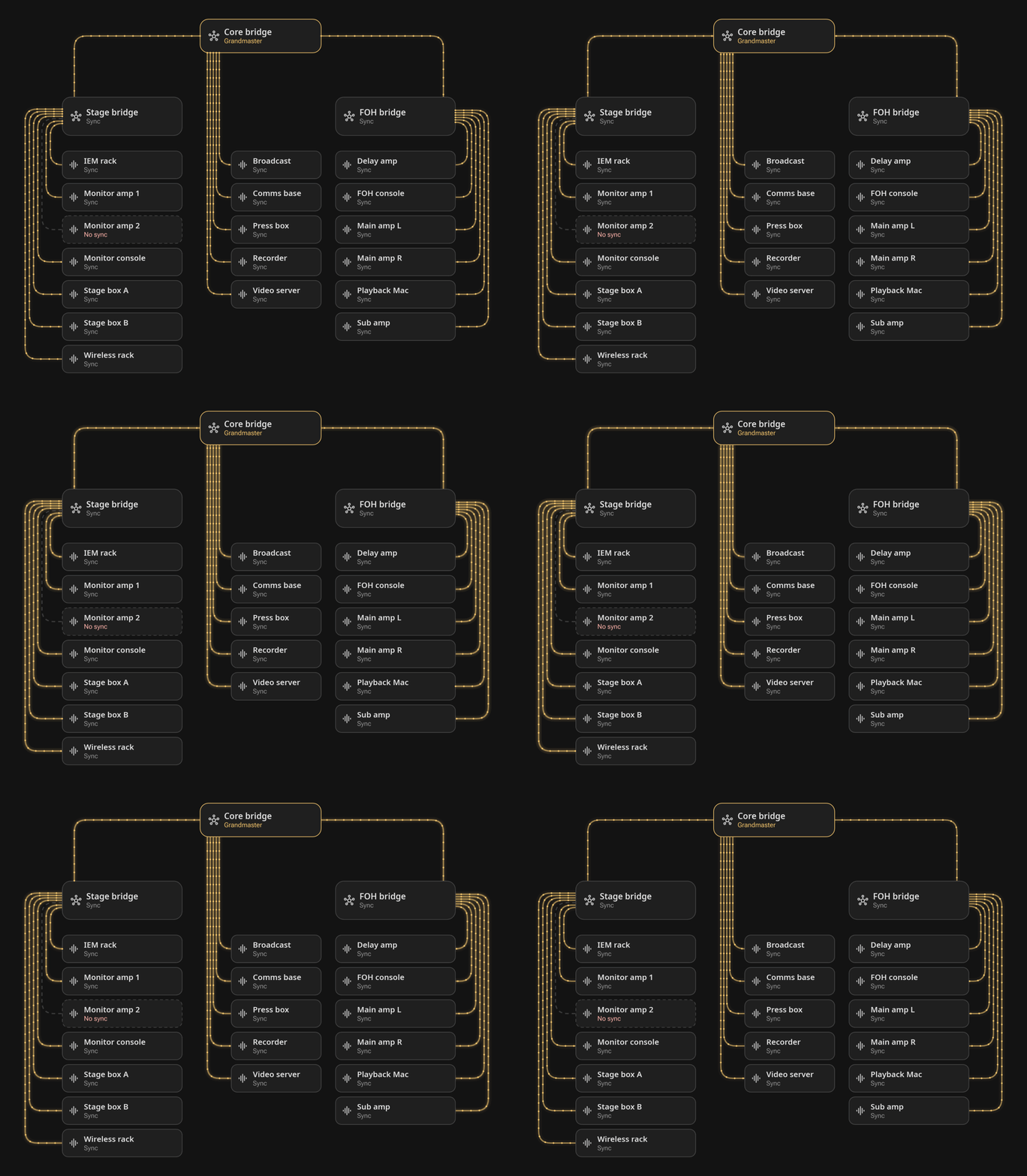
Click a wire, a device or a bridge to bring it forward on the map and open it in the inspector: a stream on its listener's Streams tab, a device on its Streams tab or, on the Sync map, under Diagnostics with its clock path by name and why it is out of sync where it is, and a bridge with the streams passing through it or the devices in sync below it. It stays forward until you clear it with the button above the map or click the background; the book button beside it says how to read the map. Controllers are left out, as they take no part in the clock or the streams, and the local host shows as its host entities. Where this computer runs none of its own, the map shows what it is plugged into: an AVB bridge's port, or a switch that takes no part in AVB.
AVB Lite
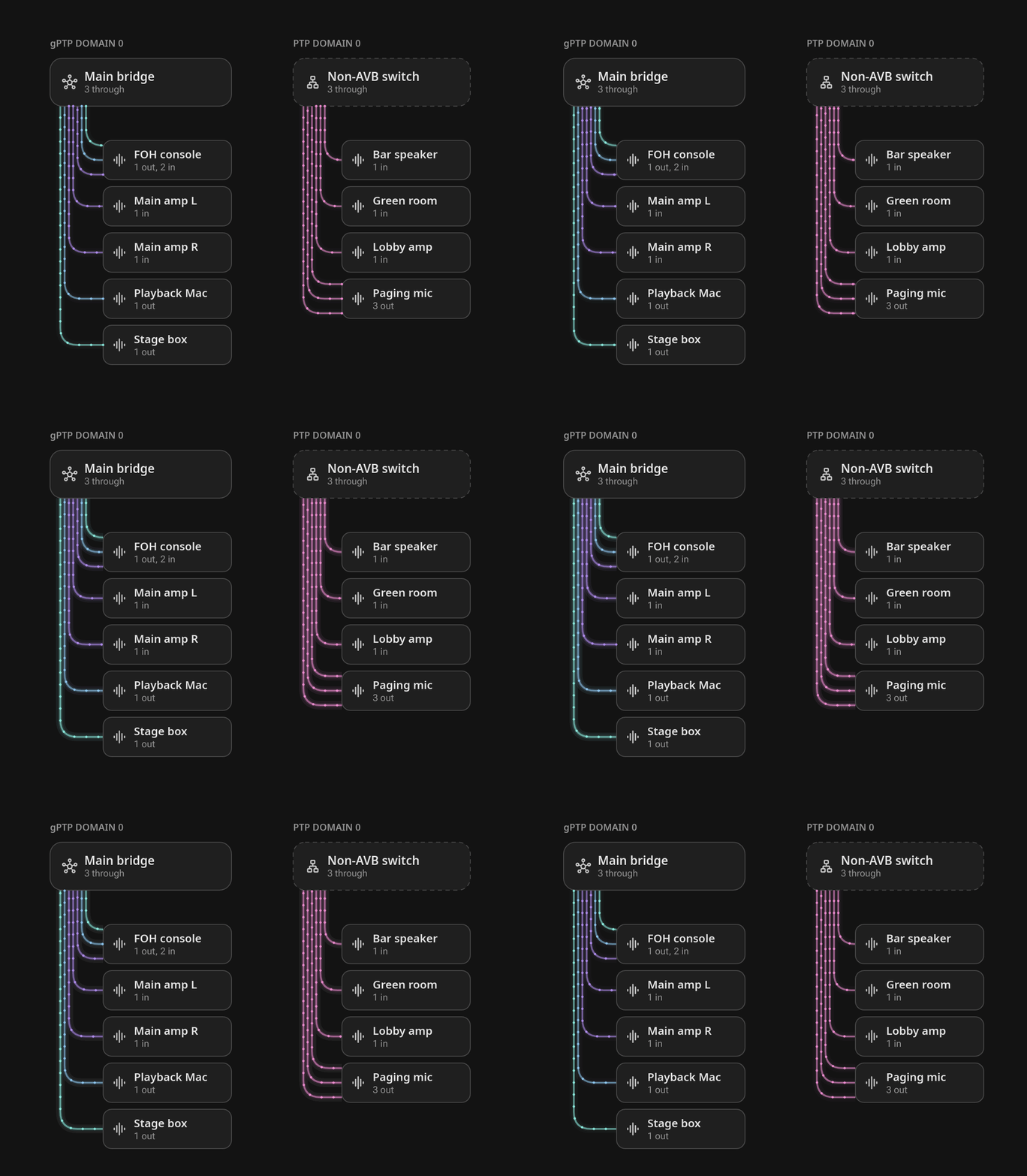
AVB Lite gives AVB devices a working if degraded path over switches that are not AVB bridges: plain PTP end to end, and streams unicast to each listener. triib shows how each entity runs it:
- The inspector's AVB Lite section gives the entity's mode and why it fell back, its PTP profile and offset from the grandmaster, its media VLAN, how many listeners it serves unicast, and its link speed.
- The network view puts the devices running AVB Lite in their PTP domain, under a dashed card for the switch in front of them that takes no part in AVB, with a wire for each listener of a unicast stream. With the Sync chip, a device is in sync while it follows its grandmaster within 50 µs.
- The alarms the profile calls for, such as a PTP offset past what AVB Lite allows, show in the status bar and the inspector.
AVB Wireless
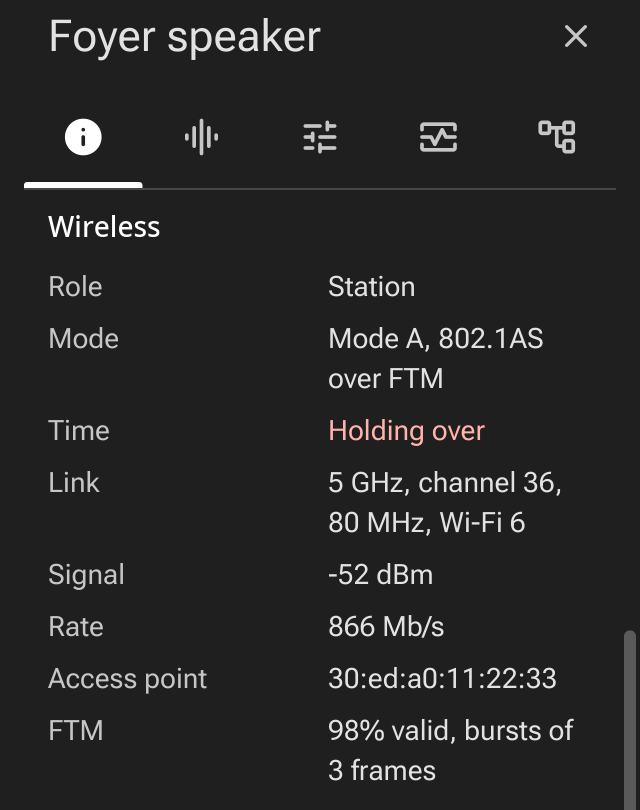
The AVB Wireless profile carries AVB over one Wi-Fi hop: an access point that is a bridge on its wired port, and Wi-Fi stations as talkers and listeners. triib asks each entity's AVB interfaces for their wireless status and shows it:
- The inspector's Wireless section gives a station's role, time mode and whether its time holds, its link, signal and rate, and the access point it follows; on an access point, its stations, the listeners it cannot serve and the frames a second it can deliver.
- An access point admits Class A only where it delivers 12000 frames a second or more;
triib-cli wireless-configallows it or keeps it off. - The network view draws each station under its access point, its Wi-Fi hop dotted, and in sync while its time is locked. A station not locked and listeners an access point cannot serve show as alarms.
Presets
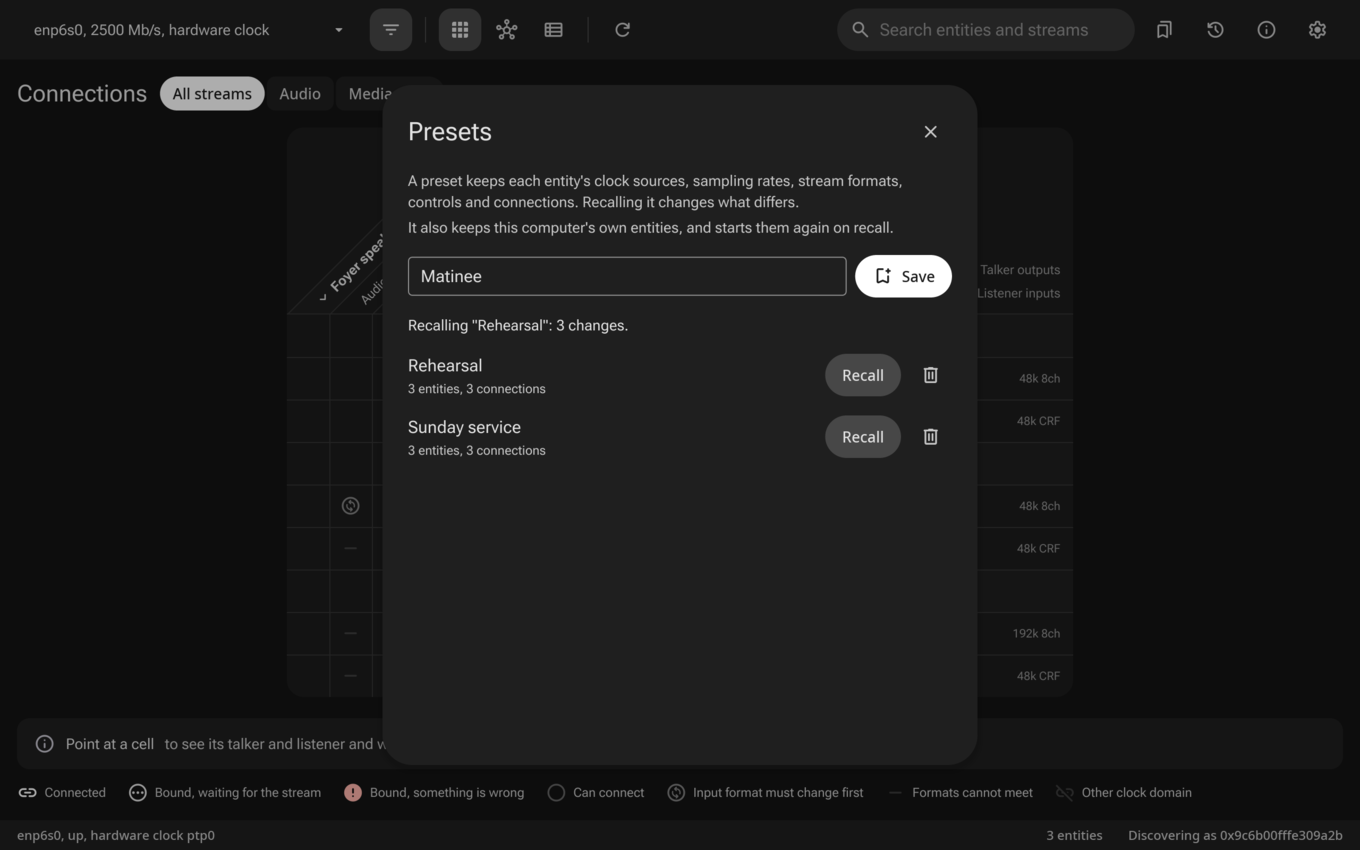
A preset keeps each entity's clock sources, sampling rates, stream formats, controls and connections, and host entities. Name it and save it from the toolbar's presets button; recalling it later changes only what differs, and says how many changes it made.
Log
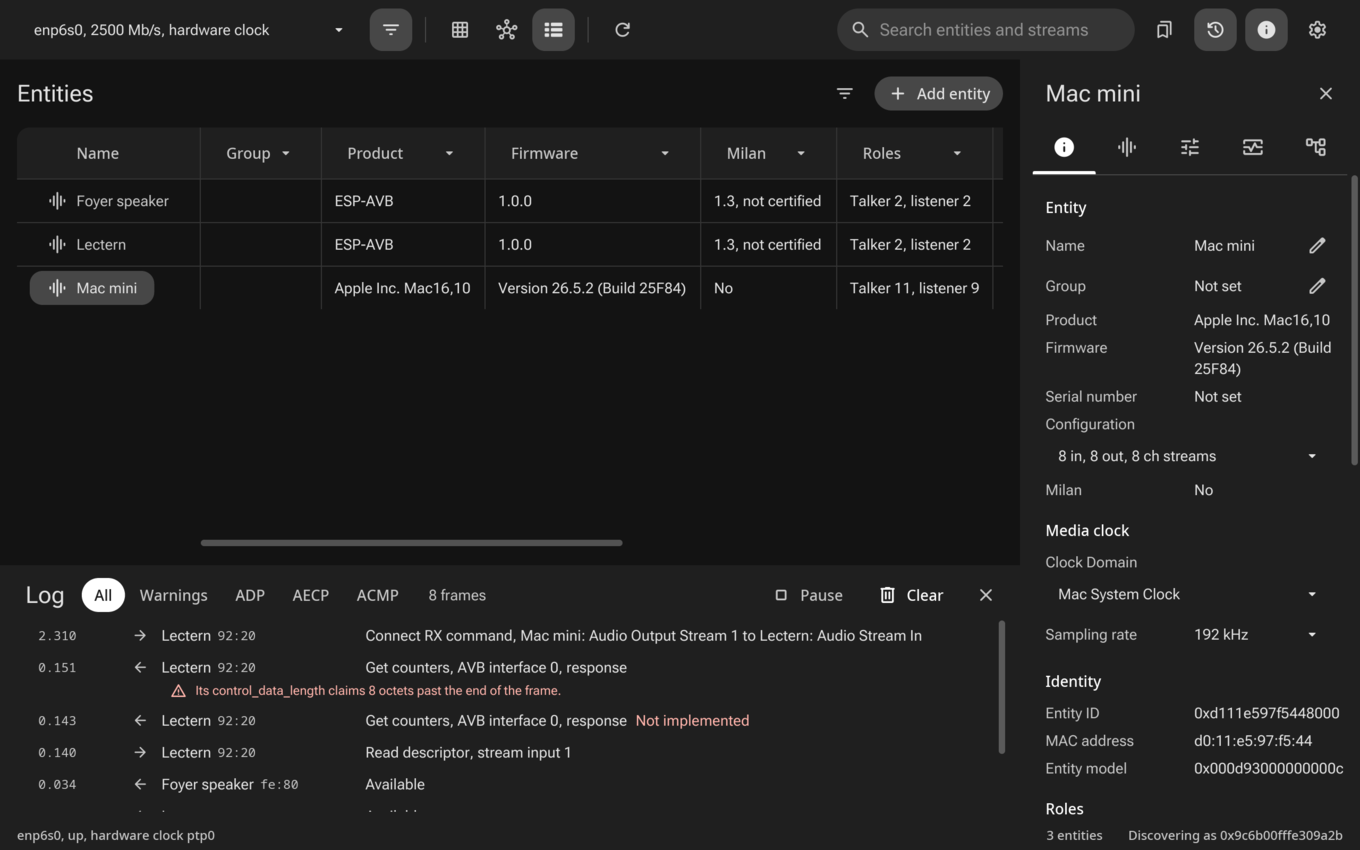
The log lists every ATDECC frame triib sends and hears, newest first, each decoded into plain words with its time, direction and entity. A frame that breaks the rules is marked with the reason, and a response that refuses a command shows its status. Show all frames, only warnings, or only ADP, AECP or ACMP; pause the log to read it, or clear it.
Host entities
On Linux, triib can run entities on the local host, which other controllers see and bind like any device. They need:
- A wired interface with a PTP hardware clock;
ethtool -T <interface>shows whether it has one. gptpd, which the packages carry, running gPTP on that interface, so the entities keep the network's time. Where none runs there, triib starts it through its systemd unit, reads its state, and says when gptpd is missing, or when another PTP daemon, such as a ptp4l run by hand, holds the interface. A host entity more than a millisecond off the last Sync reports itself out of sync.
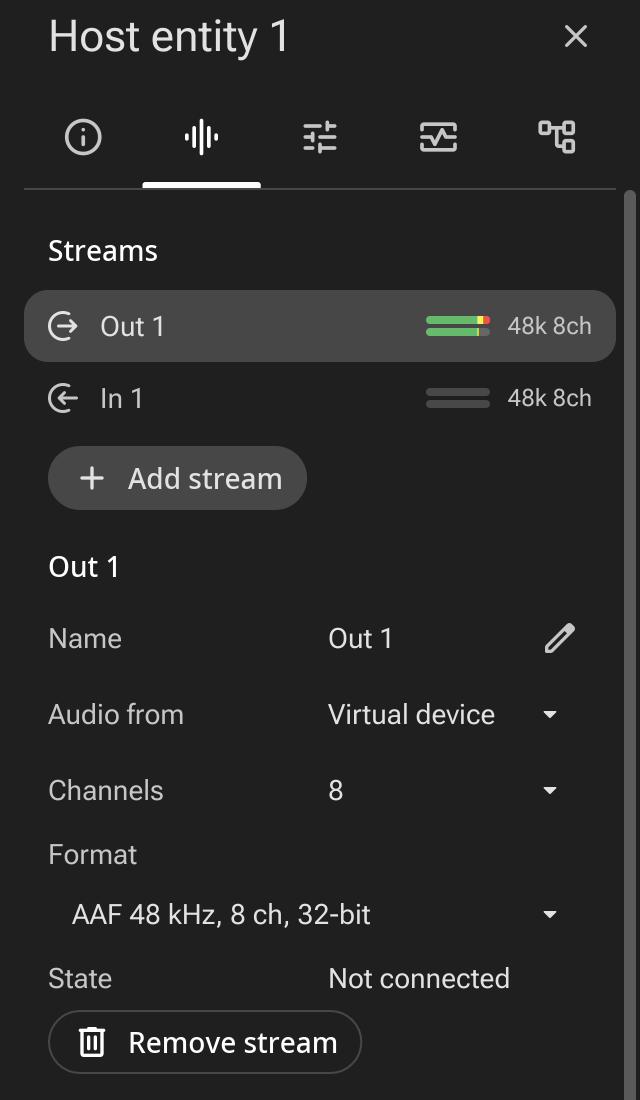
Add one with Add entity in the entity list: a Milan entity with an audio stream each way. Its Streams tab adds more with Add stream, an audio or a media clock input or output, and removes them. An audio stream is AAF or AM824 at 48, 96 or 192 kHz, 8 channels unless the inspector picks another count, and takes 2 and 8 channels too, as the Basic Audio profile asks; an output sends in SR class B in class B's own formats and in class A in the others. A media clock stream is CRF, 48 kHz with a timestamp every 96 samples.
The Streams tab's list shows a peak meter of each audio stream's first two channels: green, yellow from -12 dBFS and red from -6 dBFS. The meters cover other entities' streams too, where they connect to a host entity's.
Each audio stream has a virtual audio device of its own in PipeWire, named after the entity and the stream, such as Host entity 1 Out 1, for any program to play into or record from, unless the inspector picks one of the computer's devices, a test tone or silence instead. Any input can be the entity's clock source: its talkers then follow the clock recovered from that stream. avb-endpointd runs them all from ~/.config/avb-endpointd/<interface>.toml, and keeps the names, formats, bindings, clock sources and mappings controllers give, so an input binds again after a restart.
Where no AVB bridge answers on the interface, gptpd falls back to AVB Lite's PTP profile and the entities to AVB Lite with it, and back to gPTP when the link comes up again. The Linux packages carry a systemd unit that keeps Energy-Efficient Ethernet and PAUSE off the link, as the profile asks. The README has the settings.
The Mac's own entity
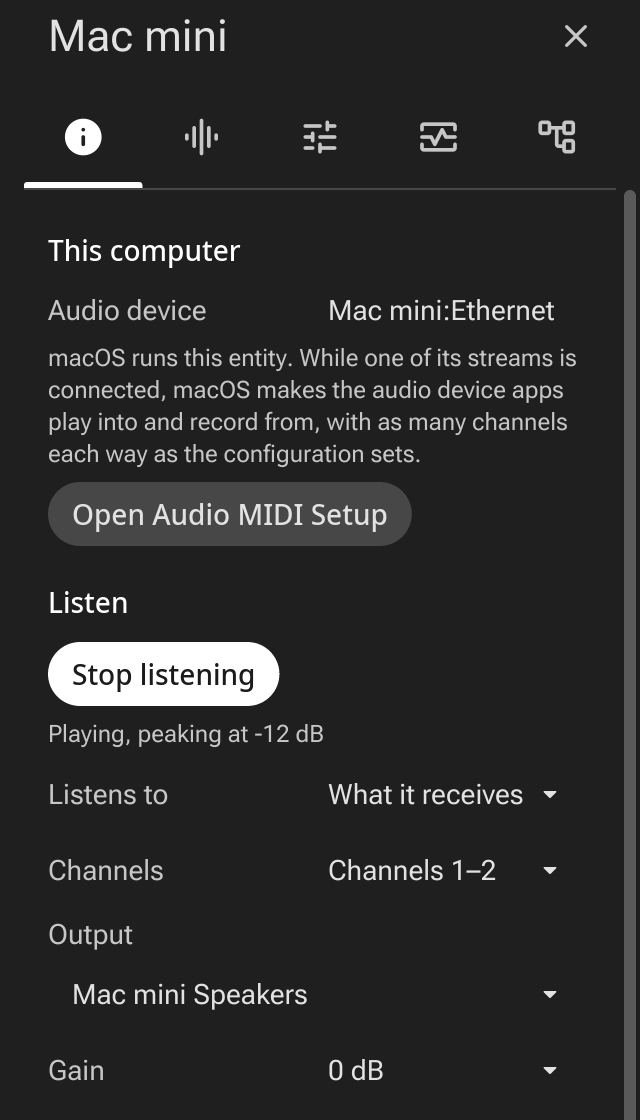
On a Mac with AVB turned on in Audio MIDI Setup's Network Device Browser, triib shows the Mac's own AVB entity as a host entity. Its inspector names the audio device apps play into and record from, which macOS makes only while one of the entity's streams is connected, and opens Audio MIDI Setup. Where AVB is off, the Entities view says where to turn it on.
Listen plays a channel or a pair of what the entity receives, or of what apps send to one of its output streams, on an output you pick, with a gain. macOS asks once for the microphone, to hear what the Mac receives, and for audio recording, to hear what it sends, which takes macOS 14.2 or later. The Streams tab's peak meters of the entity's audio streams are measured from the same audio device.
Settings
Settings has the language, any of 38 or the system's, and the appearance: light, dark or the system's, the colours, and whether triib animates. triib takes its colours from the system's accent colour, or from the Omarchy theme, unless you pick one. Settings also has outside control: whether AI agents may control triib, and the agents you have allowed, which Forget clears; and storage: the folder presets are kept in and, where host entities can run, the file they are listed in.
AI agents
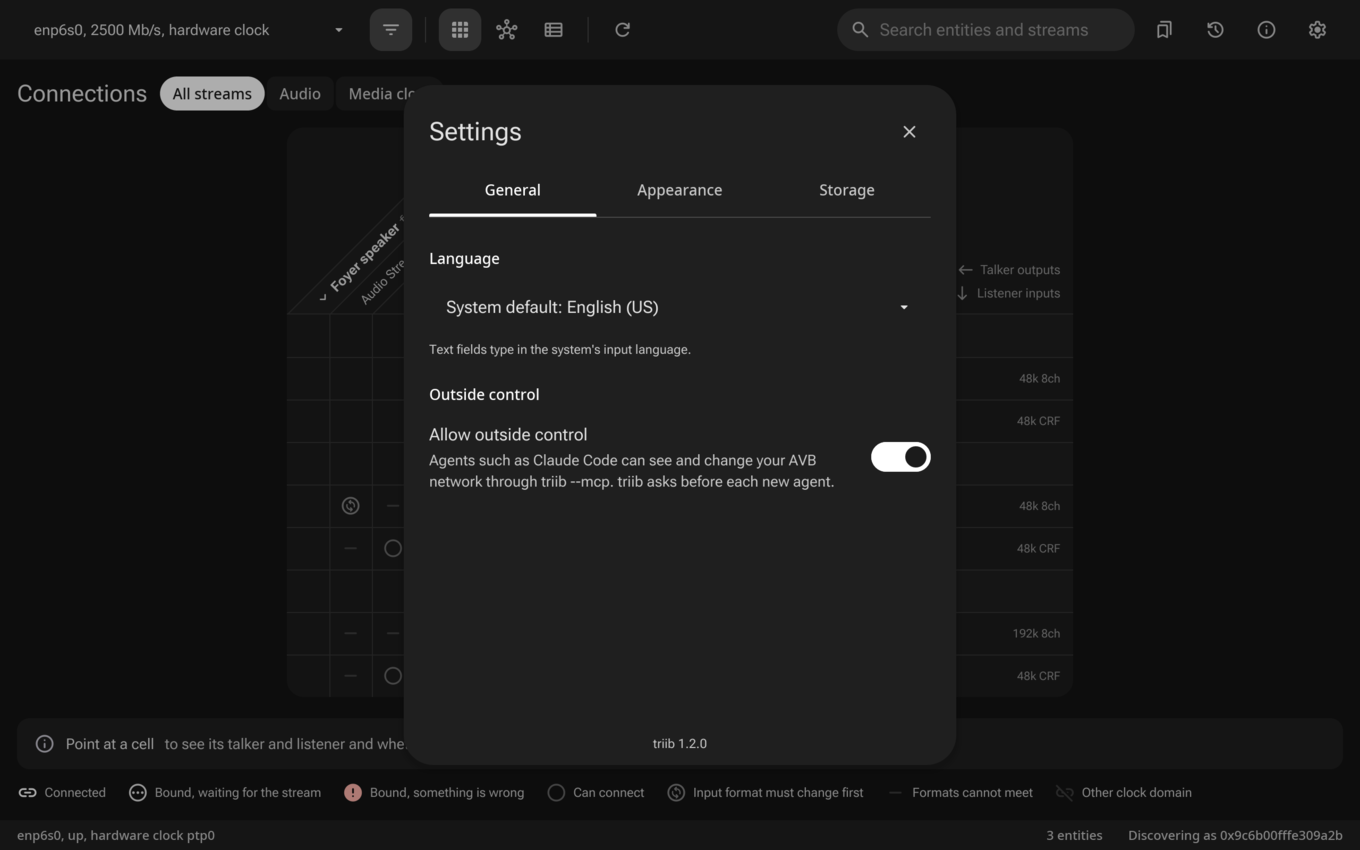
triib --mcp lets an AI agent such as Claude Code see and change your network through the triib on your desktop, over the Model Context Protocol; it starts triib when it is not running. To add it to Claude Code:
claude mcp add triib -- triib --mcpThe agent can read triib's status, the entities, each one's streams, formats and clocks, and the connections, and change what a click would: connect and disconnect streams, set a stream's format, a sampling rate or a clock source, rename and identify, and on a Mac, set what Listen plays. A change answers once the device has, with what it said. The first time an agent connects, triib asks you whether to let it in.
For a stream that does not play, the agent can ask triib what it finds wrong across the network, how that stream stands on its device, with its reservation and its counters over a few seconds, and how gPTP time reaches each device, to work out why.
Command line
triib-cli does what the app does from a terminal or a script. A few examples:
triib-cli interfaces
triib-cli discover enp2s0
triib-cli connect enp2s0 <talker-id>:0 <listener-id>:0
triib-cli rate enp2s0 <entity-id> 0 96000
triib-cli identify enp2s0 <entity-id>
triib-cli firmware enp2s0 <entity-id> firmware.bin
triib-cli log enp2s0 esp-mic --follow
Run it with no arguments for every command; the README lists them too.